
Features
Ten modules. Every plan has all of them.
Each module is a switch on the Modules screen. Turn on what the site needs and nothing else loads. Notifications and the importers are built in and always there. Here is what each one does.
Forms
Forms that already know your fields.
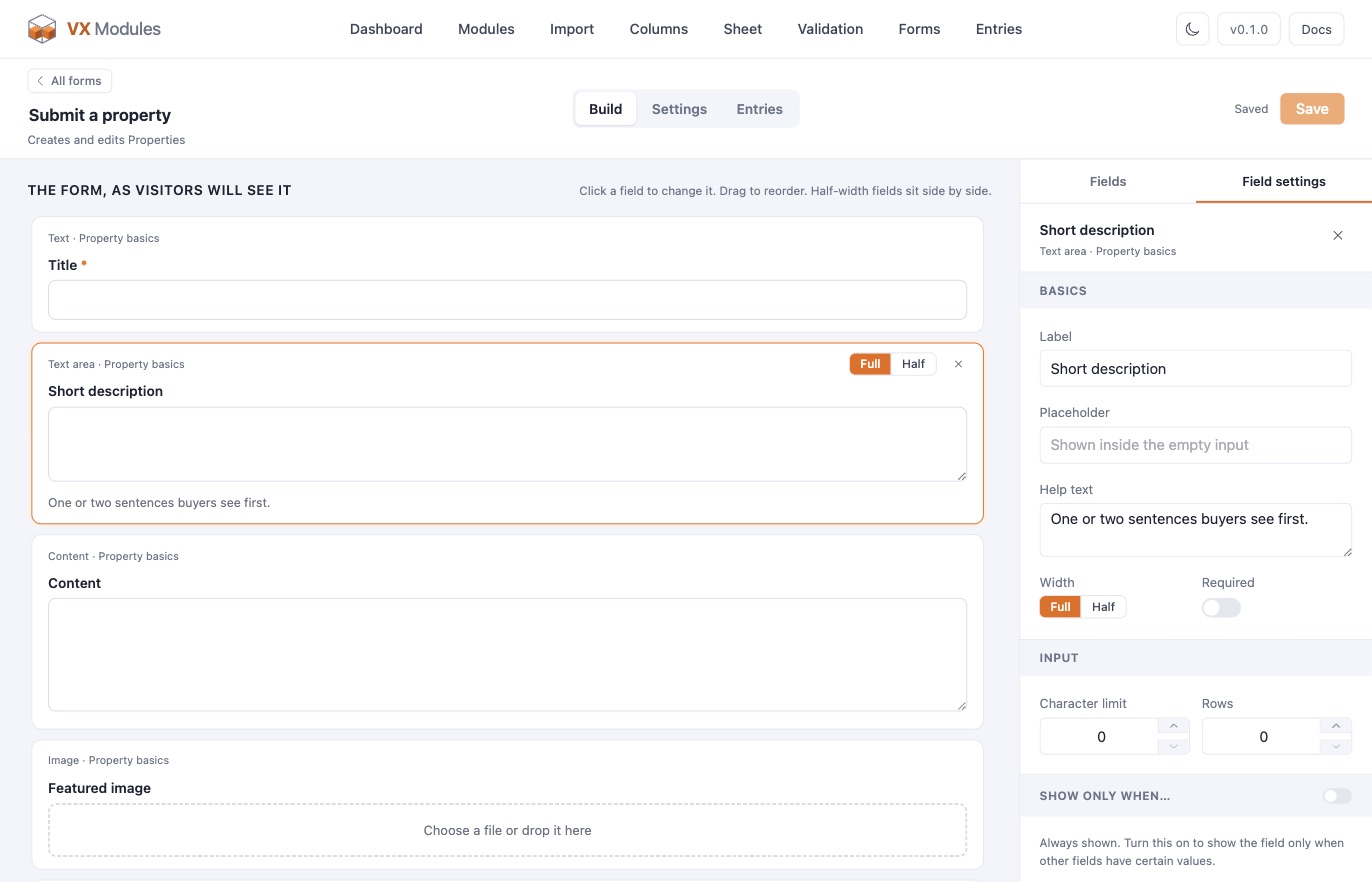
Six kinds of form: post forms that create or edit posts, standalone forms for contact and inquiries, registration forms that sign visitors up, login forms, password reset forms, and product options forms for FluentCart. Pick a post type and the form starts with every field VX knows about. Drag fields into order, set each one full or half width, add a placeholder and help text, and show a field only when another has a certain value.
- Shortcode, block editor, Elementor, or Bricks, each with its own style controls
- Notifications with a visual editor and smart codes, sent when rules match
- FluentCRM lists, tags, and custom fields; Cloudflare Turnstile against bots
- Entries with approve, deny, and resend, and a CSV of any view
Sheet
A hundred listings. One screen.
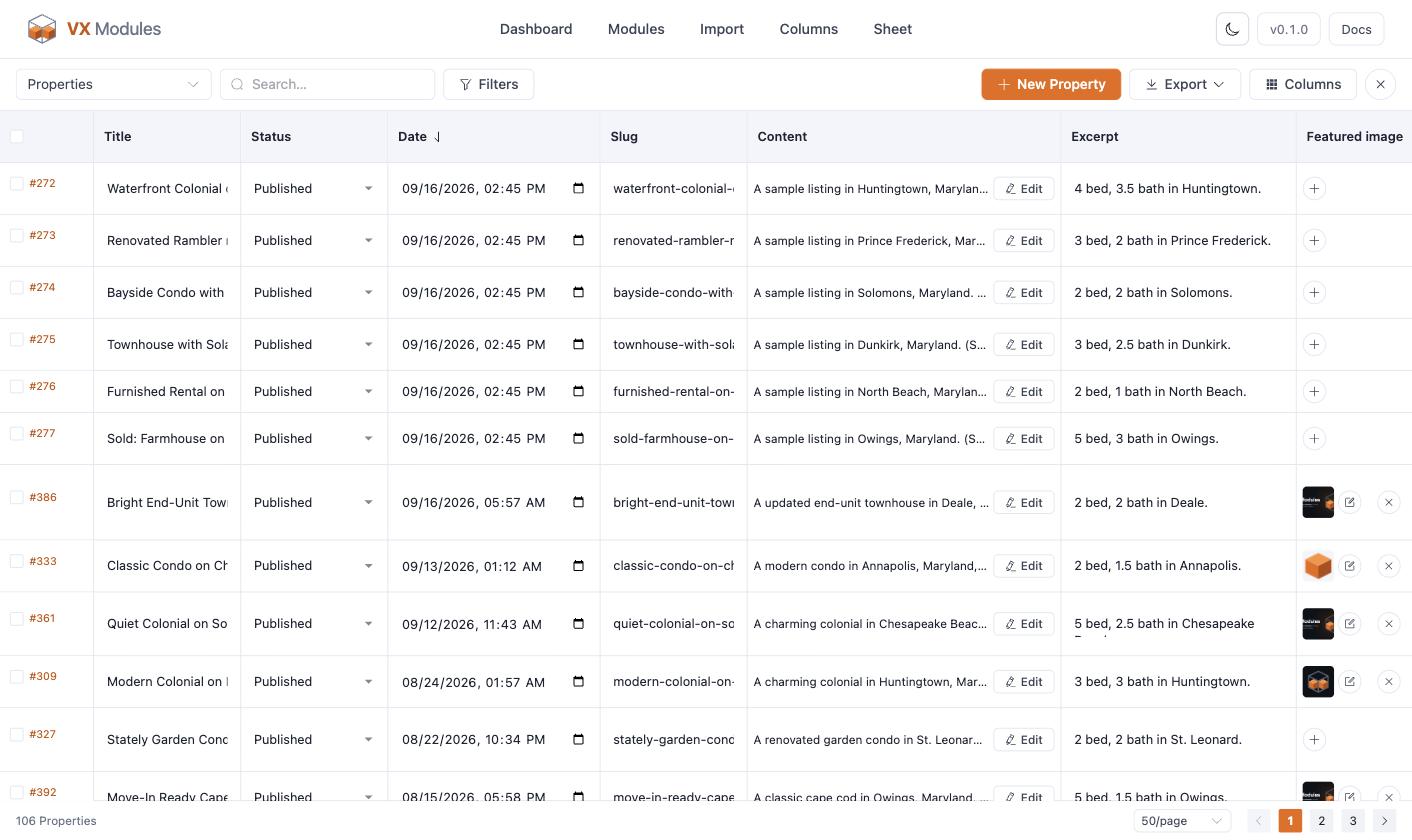
Every post of a post type in a full-screen grid, with the post's own fields, its taxonomies, and every VX field as a typed cell: inputs, dropdowns, switches, date pickers, term and relation pickers, the media library for images. Cells save on their own.
- Filter, sort, page, hide columns, add draft rows, duplicate
- Bulk edit a column with a preview before anything changes
- Groups and repeaters in their own dialog; long content opens the post's editor in a frame
- Export the view or the selected rows to CSV
Admin columns
The post list, the way you'd set it up yourself.
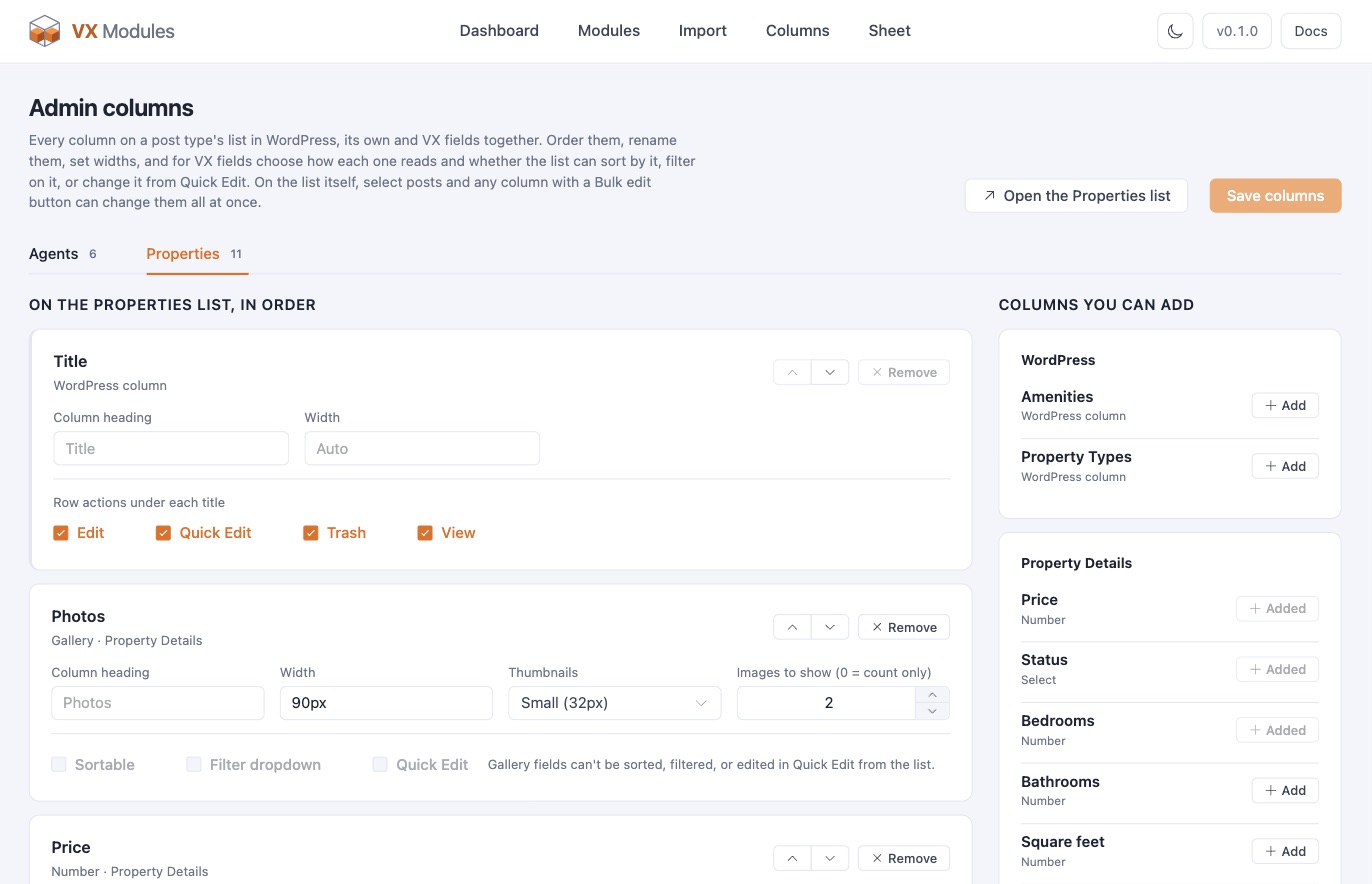
Choose the columns for each post type, WordPress's own included. Thumbnails, choice labels, formatted numbers and dates, links to related posts, switch checks. Sort and filter by them, change a value in Quick Edit, or select a few posts and bulk edit any column.
- Replace, find and replace, add to the start or end, raise or lower numbers, move dates
- Turn switches on or off, add or remove choices, terms, and related posts, or clear
- Every change previews on every selected post first, and goes through VX's validation
Validation
Rules a post must meet before it publishes.
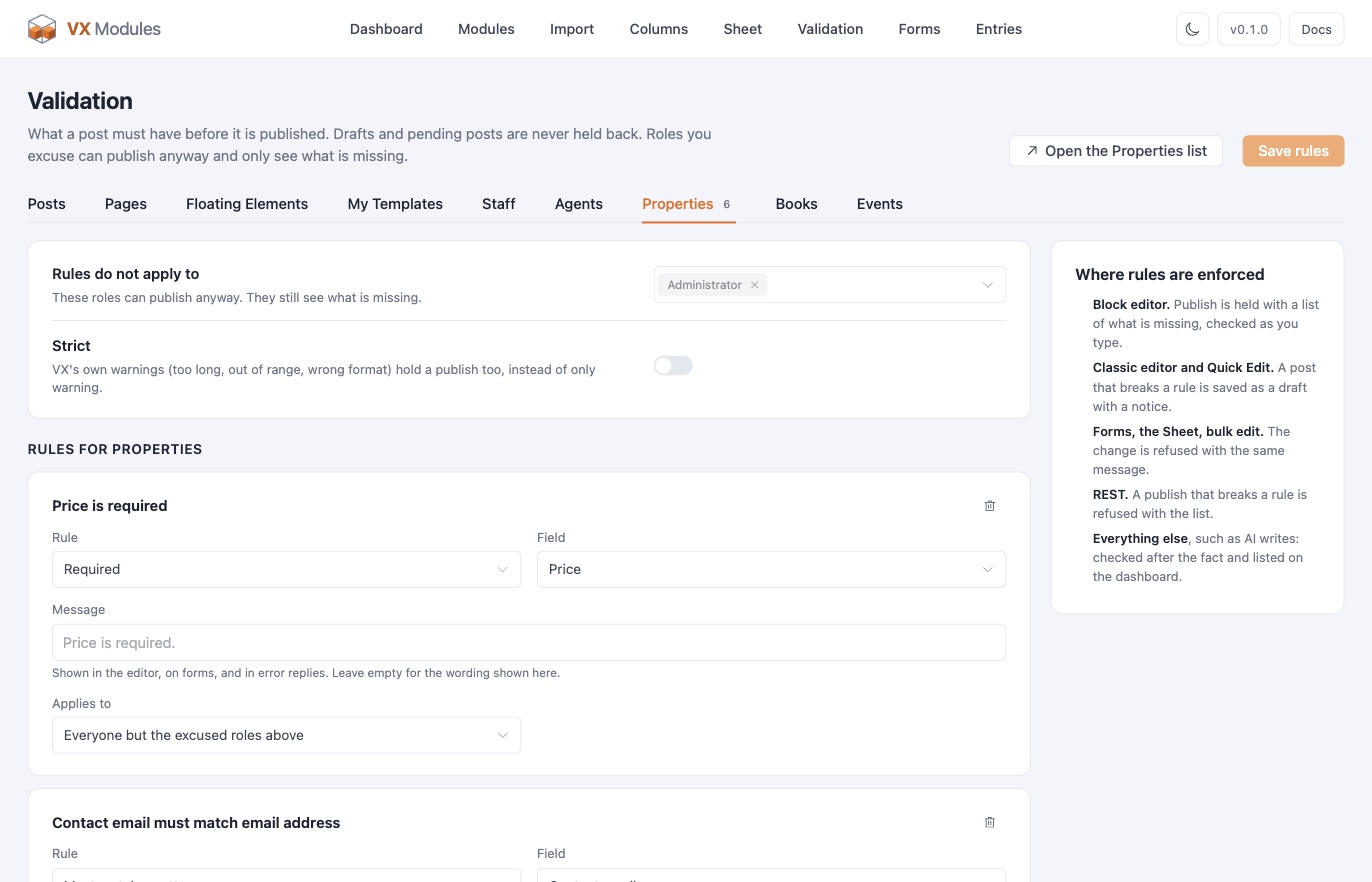
Per post type: required, required only when another field has a certain value, unique across the type, matching a pattern such as a ZIP code or an email address, or at least one of several fields filled. VX's own required flags count too. Pick roles that may publish anyway; they still see what is missing. Drafts and pending posts are never held.
- Block editor: Publish is held with a list of what is missing, checked as you type
- Classic editor and Quick Edit: the post is saved as a draft with a notice
- Forms, the Sheet, bulk edit, and REST refuse the change with the same message
- Anything else, such as AI writes, is checked after the fact and listed on the dashboard
Elementor
VX fields, rules, and loops in Elementor.
Nine dynamic tags: field, link, number, image, gallery, media, color, date, and expression. A VX picker beside every dynamic-capable control: browse the post, author, viewer, site, and term fields, or type an expression with autocomplete, stack modifiers, and see the result before you insert it. Works with Elementor and Elementor Pro, on Elementor 4's atomic elements too.
- Visibility rules on every element, evaluated by VX's own rule engine; hidden elements never reach the page source
- Loops that repeat any element per item of a repeater, gallery, list, or relation field, with nested loops and per-item rules
- Structure panel icons for bound, ruled, and looped elements, and right-click copy and paste of rules and loops
- Templates, headers, and footers stay with Elementor Pro's Theme Builder, which VX Modules does not replace
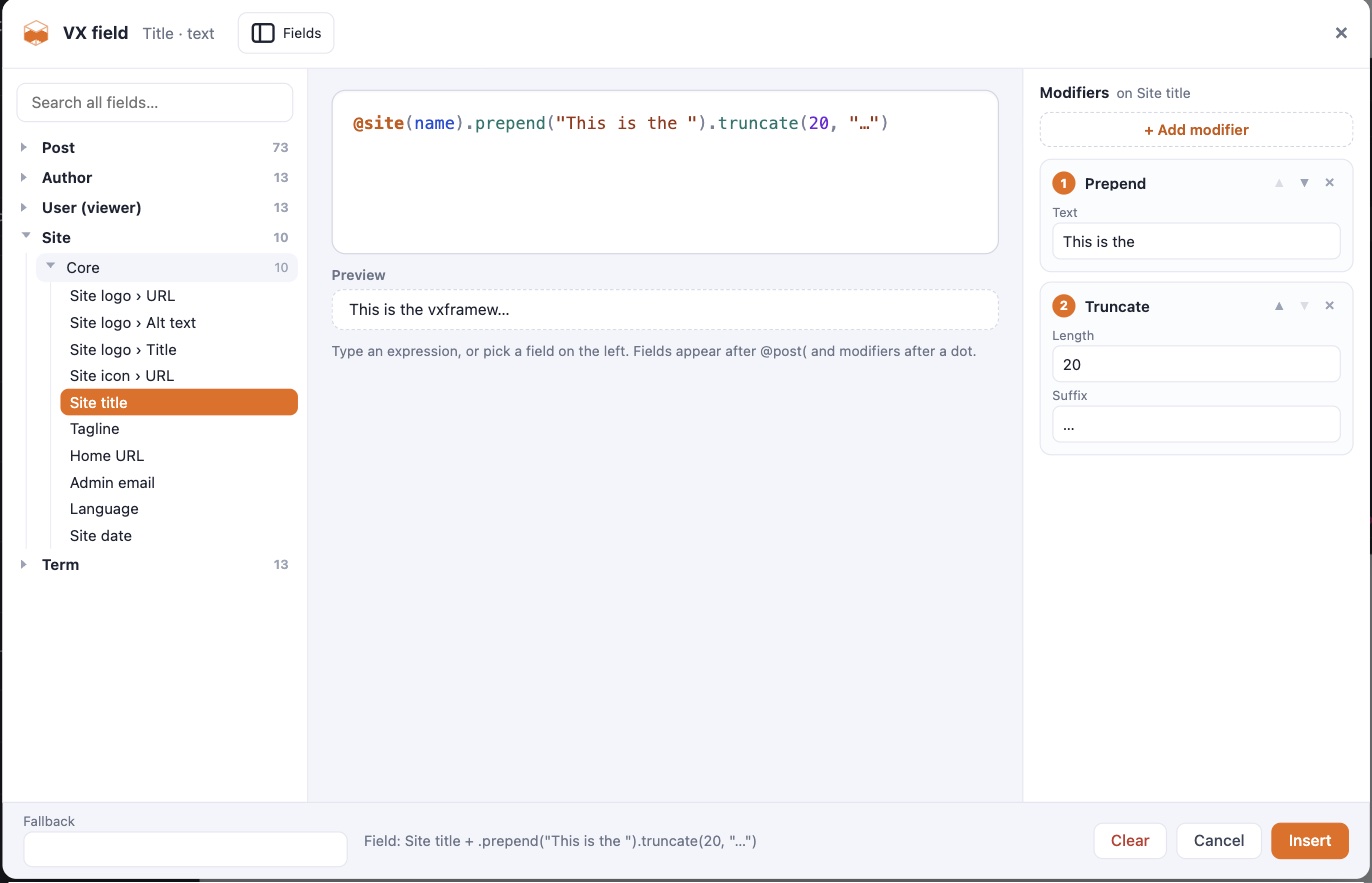
Importers and WP All Import
Moving from ACF, Meta Box, or Pods is a plan, not a leap.
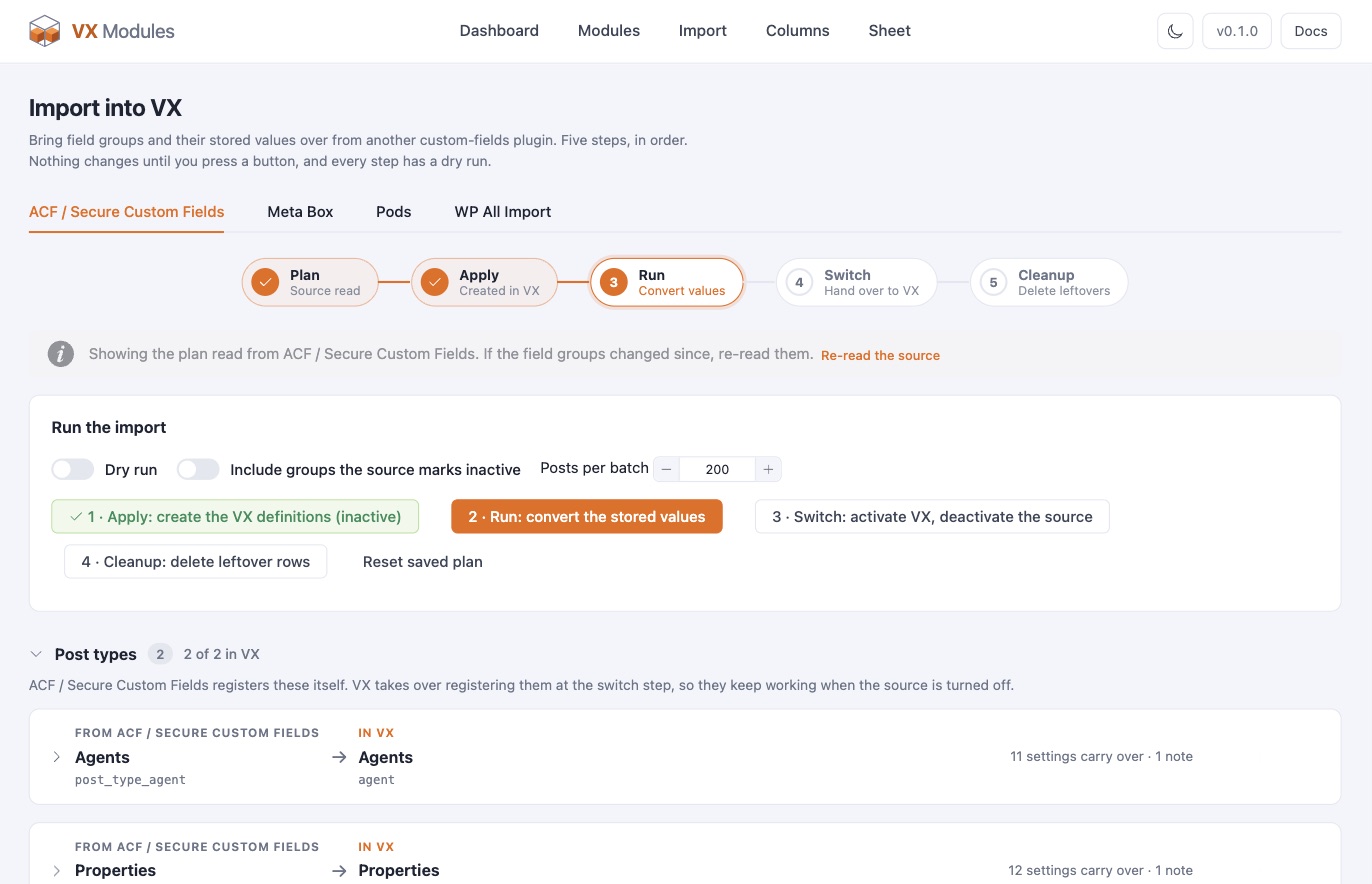
The importer reads what the other plugin registered, post types and taxonomies included, and shows a plan in plain words: what carries over as is, what gets converted, and what needs a look. Every step has a dry run, and values move before the switch, so nothing is lost in between.
- ACF and Secure Custom Fields, Meta Box, and Pods
- Bringing a spreadsheet? A VX section in WP All Import's mapping step, with auto-assign by field key. The free edition is enough.
- Also on the command line:
wp vxm import acf --dry-run
FluentCart & WooCommerce
Your store's data, in the same picker.
With either store active, the VX picker gets a Product folder: price, price range, compare-at price, on sale, stock, SKU, physical or digital, subscription, purchase link, image, categories. A Variations loop repeats any element per option with its own price, stock, and purchase link. Cart and Customer folders under the viewer give the cart's count and subtotal, and whether the viewer has bought this product or holds an active subscription to it.
Both modules publish the same tags and the same rule names, on purpose: a site that moves from one store to the other keeps its pages and its rules working. Only one of the two runs at a time.
Visibility rules
Product in stock, on sale, is a subscription; viewer has bought this product, has an active subscription, is a customer; cart has items, cart holds this product.
Product page fields
A switch lists the product's VX fields on the store's own product template — under the content on FluentCart, or under the price, in a tab, or below the product on WooCommerce. A shortcode places the same block anywhere.
Product options forms
Text, choices, and uploads a buyer fills in before adding to the cart. The answers ride with the item into the cart, the order, the receipt, and the store's own order emails — and stay as an entry that links back to the order.
Works everywhere VX Script runs
Elementor tags, the block editor's bindings, and expressions with modifiers all read the same product, cart, and customer data.
Memberships
Plans that decide how many posts a member gets.
A member buys a plan as a FluentCart subscription, and the plan says what they may post: “5 properties or rentals,” “1 free listing,” “unlimited events.” Voxel keeps memberships and paid listings in two systems that cannot talk to each other. Here a plan does both, so one subscription is the membership and the listing package.
FluentCart does the billing — checkout, Stripe or PayPal, renewals, receipts, and the customer portal. Plans, allowances, counting, and what happens to posts are VX Modules’. It works on free FluentCart; with FluentCart Pro, members also switch plans with prorated billing.
Counted the way you sell
Per plan: live posts, posts per billing period, or posts for good. A member can hold several plans and the allowances add up. A “No plan” level decides what anyone may post for free.
Enforced on every save
Forms refuse before writing, so nothing typed is lost. The block editor and REST refuse with the reason. The classic editor, Quick Edit, the Sheet, and AI agents save a draft and say why.
Perks per plan
A Featured badge, a Verified mark, a priority that puts better plans first on archives and search, and listings that expire after a set number of days.
Field limits per plan
“3 photos on Basic, 20 on Pro.” Leave a field out of a plan, or cap how many files a gallery holds.
And when a plan ends, nothing is lost.
A canceled plan keeps working until the period that was paid for runs out. Then its posts move to room on the member’s other plans first, and what does not fit is paused: hidden from the site, still there for the author. When the member buys a plan again, the paused posts come back on their own, newest first.
- A pricing table and a membership panel as a block, an Elementor widget, a Bricks element, or a shortcode
- A Membership tab in FluentCart’s customer portal
@membership(…)and@post_plan(…)tags, and visibility rules for plans, room to post, and featured or verified posts- Ten emails on the Notifications screen, from “Plan started” to “Allowance used up”
Downgrades the member chooses
Switching to a plan with less room asks which posts stay live, with the newest picked already.
A Members screen
Every member’s plans and usage, a re-sync from FluentCart, and a plan you can grant by hand for comps and partners.
Your existing posts, your call
When plans start limiting a post type, decide once whether the posts already there count, and see who would be over before you do.
Messaging
Private conversations, about the listing they are about.
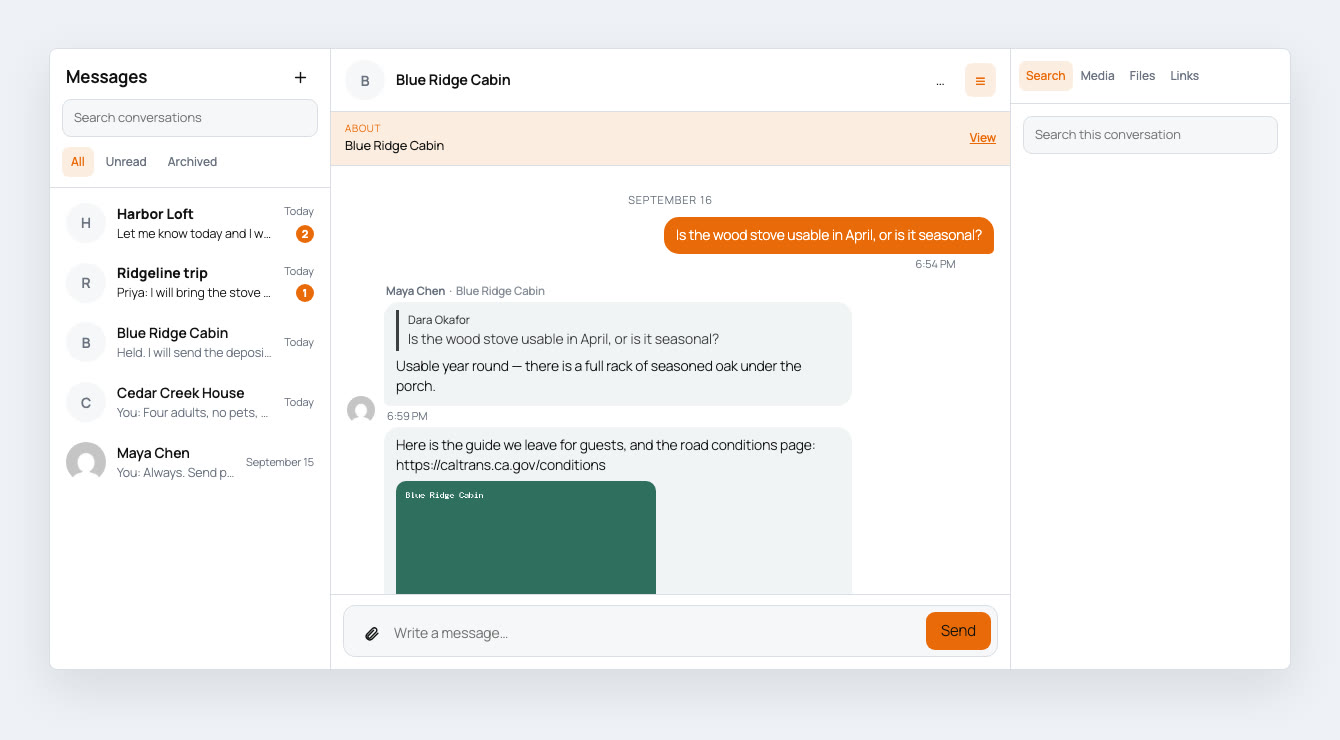
Members message each other, and visitors message the person behind a listing. A conversation can carry a post as its subject, so the owner sees what it is about — and the same thread is titled for whoever is reading it: the buyer sees the listing, the owner sees the buyer with the listing as a chip underneath.
- Starting a conversation is a link, so any button in any builder opens one
- Groups with mentions, replies that quote, read receipts, and online status
- Files kept out of the Media Library and served only to people in the conversation
- Search inside every conversation at once, and land on the message
- Blocking, reports, a moderation queue, retention, and conversation export
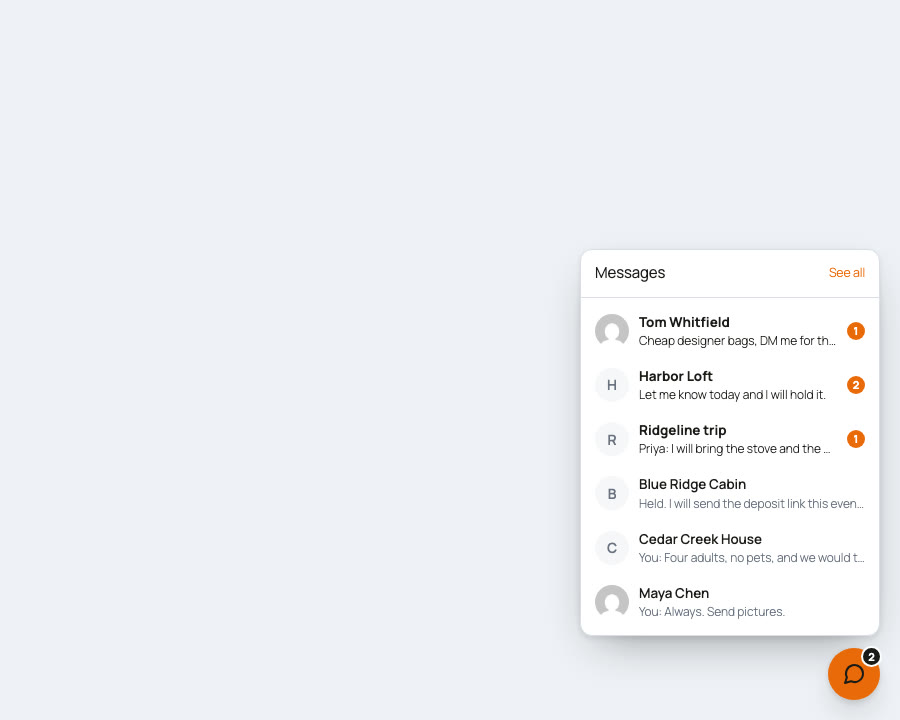
And a chat dock that follows them around.
A messenger in the corner of every page, the way a social network does it. Members carry their conversations with them instead of going back to an inbox, and it remembers what was open as they move around the site.
- New messages arrive about once a second, from an endpoint that does not load WordPress
- Block, Elementor widget, Bricks element, or shortcode — twelve groups of style controls in each
- Light by default, matching the builder, with every color a custom property
- Keyboard navigable, and it announces what arrives without reading out the whole thread
Notifications
The emails a site should send, on one screen.
When something happens, the site tells the people it concerns. Every notification is on or off by itself, separately for the admin and for the person it is about, and nothing needs switching on first — it is built in, not a module.
Messages are written with VX’s own dynamic tags, the same ones the Elementor picker offers: the post’s fields, its author, whoever acted, plus what only the notification knows, like a review link or the status before and after.
- A live preview against a real post or account, and a test send
- Sent through WordPress’s own mailer, so your SMTP plugin carries them
- Your from name and address, where admin emails go, and a clean branded layout
- A log of what was recently sent, and to whom
Every post type
Five for each post type VX manages: submitted for review, edited by its author, published, approved, and not approved.
Accounts
With Forms on: a new account, an account approved, and an account not approved.
Memberships
With Memberships on: ten more, from “Plan started” and “Payment failed” to “Post expired” and “Allowance used up.”
Sent once, with the right values
Messages go out at the end of the save, after the fields are written, and one save that fires several events sends the one that matters.
Coming next.
The order and the details come from what early-access members ask for. Say what you need and it moves up the list.
Missed-message emails
A note about the messages somebody missed while they were away, with quiet hours so nothing arrives at three in the morning.
Building nextSign-in extras
One-time codes by email, two-step sign-in, and social login.
PlannedReview forms
Star ratings, one review per person, and the reviewed post filled in from the page.
PlannedShaped by early access
Early-access members hear about each module as it lands and steer what comes next.
YouAll ten in one plan.
There are no tiers and no add-ons. Every module on this page is included, on every plan.